---
title: Generating Renewal Reports in GloveBox CRM, formerly Better Agency
description: This guide walks you through the process of accessing and exporting renewal reports for your pipeline, including upcoming renewals.
---
[Skip to content](https://gbu.gloveboxapp.com/knowledge/generating-renewal-reports-in-better-agency#main-content)
English
Show submenu for translations

- [GloveBox Website](https://glovebox.io/)
Open main navigation
Close main navigation
- [GloveBox Website](https://glovebox.io/)
- English
Show submenu for translations
How can we help you?
- There are no suggestions because the search field is empty.
1. [GloveBox University](https://gbu.gloveboxapp.com/knowledge?hsLang=en)
2. [Resources for GloveBox CRM Clients](https://gbu.gloveboxapp.com/knowledge/resources-for-glovebox-crm-clients?hsLang=en)
3. [Utilizing GloveBox CRM's Pipelines](https://gbu.gloveboxapp.com/knowledge/resources-for-glovebox-crm-clients?hsLang=en#utilizing-glovebox-crms-pipelines)
# Generating Renewal Reports in GloveBox CRM, formerly Better Agency
## This guide walks you through the process of accessing and exporting renewal reports for your pipeline, including upcoming renewals and those that have already been processed.
### Overview
This guide walks you through the process of accessing and exporting renewal reports for your pipeline, including upcoming renewals and those that have already been processed. Since direct export from the pipeline view is not available, you will use two key reports: **Renewal Performance** and **Projected Renewals** to get a comprehensive picture.
#### **Accessing Renewal Reports**
1. **Navigate to Reports**
- Go to the left-hand navigation menu.
- Select **Reporting** \> **Sales Reports**.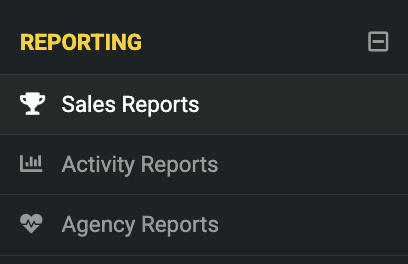
2. **Locate the Reports**
- You will find two reports: **Renewal Performance** and **Projected Renewals**.
#### **Using the Renewal Performance Report**
This report shows renewals that have already been processed in the system.
1. **Open the Renewal Performance Report**.
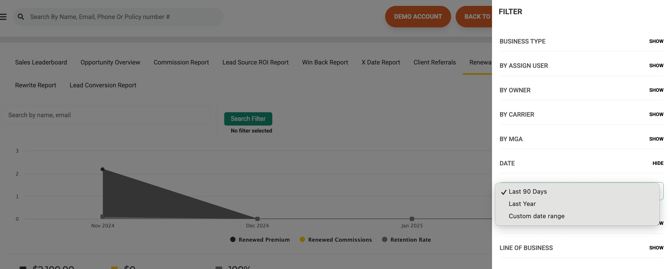
2. **Filter by Date Range**:
- By default, the report pulls data from the last 90 days.
- For a specific month, select **Custom Date Range** and enter your desired period (e.g., January 1st - January 31st).
1. **Review Effective Dates**:
- The report lists renewals with their corresponding effective dates.
2. **Export Data**:
- Click the checkbox to select all items.
- Click **Export Data**.
- Confirm the export and download the CSV file.

#### **Using the Projected Renewals Report**
This report shows upcoming renewals and estimated premiums.
1. **Open the Projected Renewals Report**.
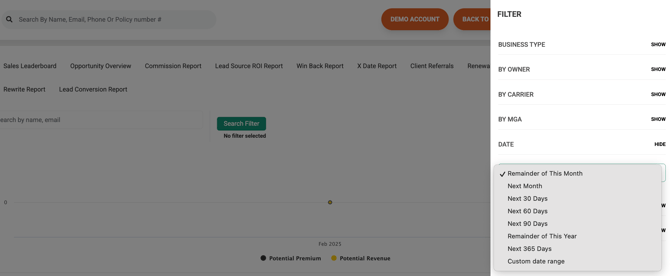
2. **Adjust the Date Range**:
- The default view shows expiration dates for the current month.
- To see future renewals, select **Custom Date Range** (e.g., March 1st - March 31st).
1. **Sort Data**:
- Click the expiration date column to organize renewals chronologically.
2. **Export Data**:
- No need to manually select items. Click **Export Data** to download all filtered results.
#### **Combining Reports for a Full Renewal Pipeline View**
- **For past renewals**, use the **Renewal Performance Report**.
- **For future renewals**, use the **Projected Renewals Report**.
- **For a full view of your renewal pipeline**, set your **Projected Renewals Report** to cover a **45-day range** (e.g., from today through the next 45 days). This best aligns with the system’s renewal pipeline logic.
#### **Additional Actions**
- If you notice a renewal in **Projected Renewals** that has already been processed, you can manually update it to move it into **Renewal Performance**.
- Sorting by expiration date ensures your report reflects the expected order of renewals.
### **Need Help?**
If you have any questions or need further assistance, please reach out to our support team.
---

- [GloveBox Quick Links (Start Here!)](https://gbu.gloveboxapp.com/knowledge/glovebox-quick-links-start-here?hsLang=en#main-content)
- [Key GloveBox Resources](https://gbu.gloveboxapp.com/knowledge/glovebox-quick-links-start-here?hsLang=en#key-glovebox-resources)
- [GloveBox Training Events](https://gbu.gloveboxapp.com/knowledge/glovebox-quick-links-start-here?hsLang=en#glovebox-training-events)
- [FAQs](https://gbu.gloveboxapp.com/knowledge/glovebox-quick-links-start-here?hsLang=en#faqs)
- [Client Onboarding Resources](https://gbu.gloveboxapp.com/knowledge/client-onboarding-resources?hsLang=en#main-content)
- [Completing Your Account Set-Up](https://gbu.gloveboxapp.com/knowledge/client-onboarding-resources?hsLang=en#completing-your-account-set-up)
- [Email Campaigns to Promote GloveBox](https://gbu.gloveboxapp.com/knowledge/client-onboarding-resources?hsLang=en#email-campaigns-to-promote-glovebox)
- [Launching and the GloveBox Rollout](https://gbu.gloveboxapp.com/knowledge/client-onboarding-resources?hsLang=en#launching-and-the-glovebox-rollout)
- [Agency Internal Process Updates](https://gbu.gloveboxapp.com/knowledge/client-onboarding-resources?hsLang=en#agency-internal-process-updates)
- [Key GloveBox Workflows](https://gbu.gloveboxapp.com/knowledge/key-glovebox-workflows?hsLang=en#main-content)
- [Managing Client Profiles and Policies](https://gbu.gloveboxapp.com/knowledge/key-glovebox-workflows?hsLang=en#managing-client-profiles-and-policies)
- [Driving Client Adoption with GloveBox](https://gbu.gloveboxapp.com/knowledge/key-glovebox-workflows?hsLang=en#driving-client-adoption-with-glovebox)
- [Resources for Agency Administrators](https://gbu.gloveboxapp.com/knowledge/key-glovebox-workflows?hsLang=en#resources-for-agency-administrators)
- [Glovebox Updates + Enhancements](https://gbu.gloveboxapp.com/knowledge/glovebox-updates-enhancements?hsLang=en#main-content)
- [Latest Release: PolicyAssist](https://gbu.gloveboxapp.com/knowledge/glovebox-updates-enhancements?hsLang=en#latest-release-policyassist)
- [Now Available: GloveBox's White Label App Offering](https://gbu.gloveboxapp.com/knowledge/glovebox-updates-enhancements?hsLang=en#now-available-gloveboxs-white-label-app-offering)
- [GloveBox and Your AMS Data](https://gbu.gloveboxapp.com/knowledge/glovebox-and-your-ams-data?hsLang=en#main-content)
- [Setting Up Your Client List By AMS](https://gbu.gloveboxapp.com/knowledge/glovebox-and-your-ams-data?hsLang=en#setting-up-your-client-list-by-ams)
- [Additional AMS Data Resources](https://gbu.gloveboxapp.com/knowledge/glovebox-and-your-ams-data?hsLang=en#additional-ams-data-resources)
- [Carrier Connections + Integrations](https://gbu.gloveboxapp.com/knowledge/carrier-connections-integrations?hsLang=en#main-content)
- [Applied EPIC SDK Data and Documents Integration](https://gbu.gloveboxapp.com/knowledge/carrier-connections-integrations?hsLang=en#applied-epic-sdk-data-and-documents-integration)
- [Book of Business Carrier Connection](https://gbu.gloveboxapp.com/knowledge/carrier-connections-integrations?hsLang=en#book-of-business-carrier-connection)
- [Policyholder Resources for ClientHub and the Mobile Apps](https://gbu.gloveboxapp.com/knowledge/policyholder-resources-for-clienthub-and-the-mobile-apps?hsLang=en)
- [Resources for GloveBox CRM Clients](https://gbu.gloveboxapp.com/knowledge/resources-for-glovebox-crm-clients?hsLang=en#main-content)
- [GloveBox CRM Account Setup](https://gbu.gloveboxapp.com/knowledge/resources-for-glovebox-crm-clients?hsLang=en#glovebox-crm-account-setup)
- [Managing Service with GloveBox CRM](https://gbu.gloveboxapp.com/knowledge/resources-for-glovebox-crm-clients?hsLang=en#managing-service-with-glovebox-crm)
- [Utilizing GloveBox CRM's Pipelines](https://gbu.gloveboxapp.com/knowledge/resources-for-glovebox-crm-clients?hsLang=en#utilizing-glovebox-crms-pipelines)
- [Building & Managing Campaigns in GloveBox CRM](https://gbu.gloveboxapp.com/knowledge/resources-for-glovebox-crm-clients?hsLang=en#building-managing-campaigns-in-glovebox-crm)
- [Using GloveBox CRM's Medicare App](https://gbu.gloveboxapp.com/knowledge/resources-for-glovebox-crm-clients?hsLang=en#using-glovebox-crms-medicare-app)
- [Integrations](https://gbu.gloveboxapp.com/knowledge/resources-for-glovebox-crm-clients?hsLang=en#integrations)
- [Agency Best Practices](https://gbu.gloveboxapp.com/knowledge/agency-best-practices?hsLang=en)
[](http://Gloveboxapp.com)
*Still need assistance?
Contact us at: [support@gloveboxapp.com](mailto:support@gloveboxapp.com)*
[mailto:support@gloveboxapp.com](mailto:support@gloveboxapp.com)
Copyright © 2025, GloveBox Inc.