
Summary
This brief article covers how to reference and retrieve your GloveBox platform's unique identifier, or Agency ID.
Why It Matters
Your Agency ID is specific to your account, and may be required when:
- Configuring an AMS Integration
- Verifying Your Identity in relation to an Agency
- Troubleshooting a technical issue
Where to Find Your Agency ID
When logged into GloveBoxHQ, your specific ID can be found just underneath your Agency's name at the top of the left-hand navigation menu.
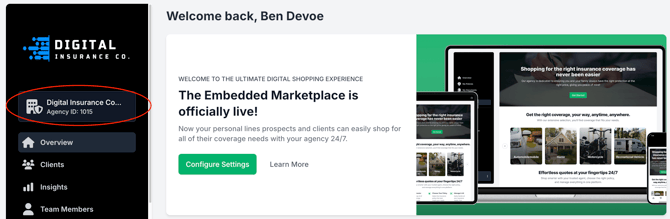
- The Agency ID is ONLY visible within GloveBoxHQ, not the ClientHub portal
- Agencies with Platforms will have separate IDs for each, and are displayed in the same way as above.