---
title: How to Edit Your Email Signature in GloveBox CRM, formerly Better Agency
description: Customizing your email signature in Better Agency is a simple process that gives you complete control over its design. Follow these step-by-step instructions to create or update your email signature.
---
[Skip to content](https://gbu.gloveboxapp.com/knowledge/how-to-edit-your-email-signature-in-better-agency#main-content)
English
Show submenu for translations

- [GloveBox Website](https://glovebox.io/)
Open main navigation
Close main navigation
- [GloveBox Website](https://glovebox.io/)
- English
Show submenu for translations
How can we help you?
- There are no suggestions because the search field is empty.
1. [GloveBox University](https://gbu.gloveboxapp.com/knowledge?hsLang=en)
2. [Resources for GloveBox CRM Clients](https://gbu.gloveboxapp.com/knowledge/resources-for-glovebox-crm-clients?hsLang=en)
3. [GloveBox CRM Account Setup](https://gbu.gloveboxapp.com/knowledge/resources-for-glovebox-crm-clients?hsLang=en#glovebox-crm-account-setup)
# How to Edit Your Email Signature in GloveBox CRM, formerly Better Agency
## Customizing your email signature in GloveBox CRM is a simple process that gives you complete control over its design. Follow these step-by-step instructions to create or update your email signature.
**Steps to Edit Your Email Signature**
#### **1. Navigate to Your Profile**
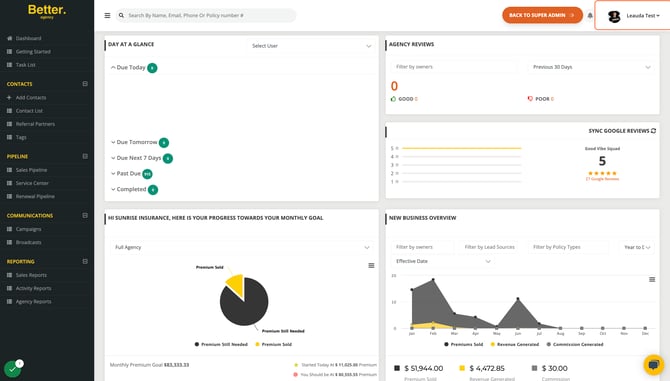
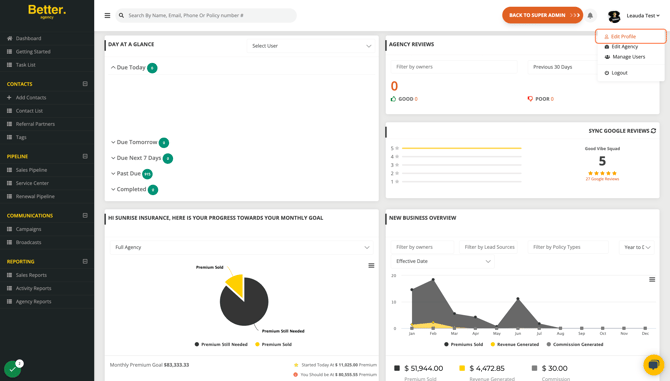
- From your GloveBox CRM dashboard, click on your profile name in the upper-right corner.
- Select **"Edit Profile"** from the dropdown menu.
#### ****
#### **2. Locate the Email Signature Section**
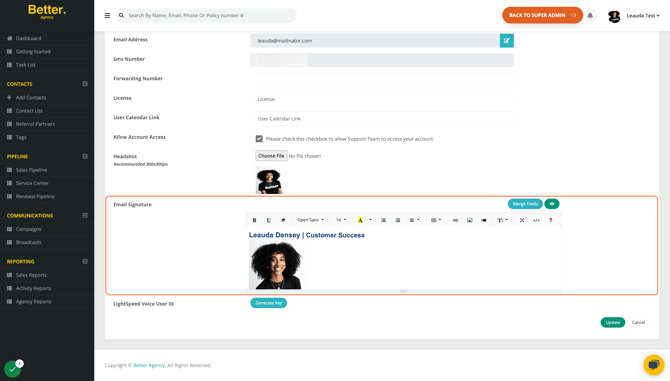
- Scroll to the bottom of the profile settings page until you find the **"Email Signature"** section.
#### **3. Customize Your Signature**
- Use this area to edit and personalize your signature.
- You can:
- Add or delete images.
- Include merge fields such as **{user.logo}** (your headshot) or **{agency.logo}** (your agency logo).
- Format text with your preferred font, size, and color.
#### ****
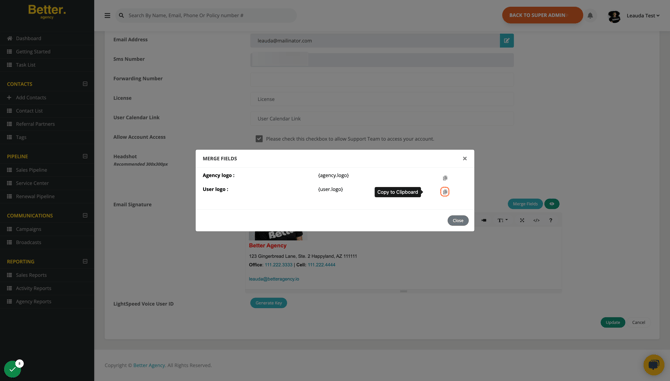
#### **4. Use Merge Fields**
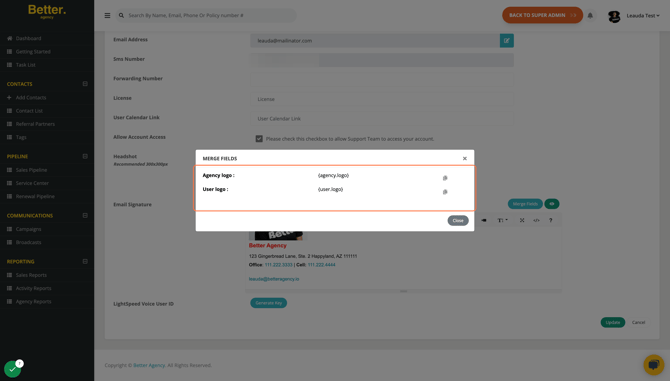
- To add merge fields:
- Click the **"Merge Fields"** button.
- Select the desired field, such as **"User Logo"** or **"Agency Logo"**.
- Click the **"Copy"** icon next to the merge field.
- Paste the merge field code (e.g., **{user.logo}**) into your signature.
#### ****
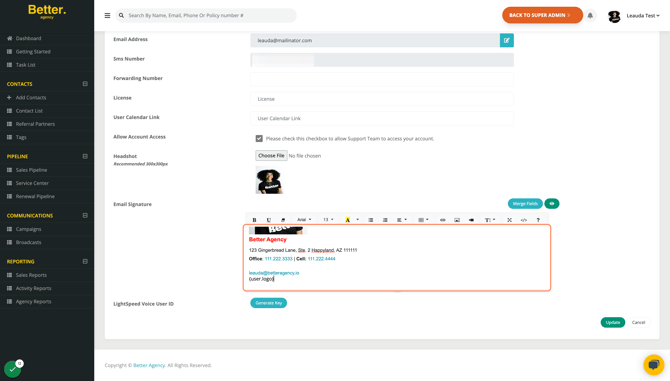
#### **5. Preview Your Signature**
- After making changes, click the **"View"** icon to preview your signature.
- Ensure the layout, images, and text appear as intended.
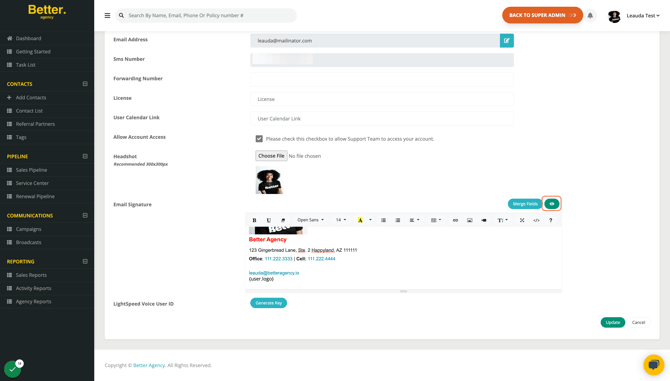
#### **6. Save Your Changes**
- Once satisfied with your signature, click **"Update"** to save the changes.
---
### **Special Instructions for Pre-Designed Signatures**
If you’re using a pre-designed email signature, follow these additional steps:
#### **Prepare Your Signature**
- Copy the signature into a Google Doc to check formatting.
- Ensure the font, sizes, and colors display correctly.
- Avoid pasting the signature directly into a Word document, as it may introduce formatting issues.
- Refer to this [article](https://help.betteragency.io/emails-not-showing-up-correctly-in-the-browser) for more details.
#### **Transfer the Signature**
- Once formatting is confirmed, copy the signature from the Google Doc.
- Paste it directly into the **"Email Signature"** section in GloveBox CRM.
#### **Final Steps**
- Preview the signature using the **"View"** icon.
- If everything looks good, click **"Update"** to save.
---
### **FAQs and Troubleshooting**
- **Why should I avoid using Word for formatting?** Word documents often include hidden formatting that may cause issues when displayed in GloveBox CRM or email clients.
- **Can I update my signature later?** Yes, you can revisit your profile settings at any time to make changes.
For further assistance, contact our support team or refer to additional articles in our knowledge base.
- [GloveBox Quick Links (Start Here!)](https://gbu.gloveboxapp.com/knowledge/glovebox-quick-links-start-here?hsLang=en#main-content)
- [Key GloveBox Resources](https://gbu.gloveboxapp.com/knowledge/glovebox-quick-links-start-here?hsLang=en#key-glovebox-resources)
- [GloveBox Training Events](https://gbu.gloveboxapp.com/knowledge/glovebox-quick-links-start-here?hsLang=en#glovebox-training-events)
- [FAQs](https://gbu.gloveboxapp.com/knowledge/glovebox-quick-links-start-here?hsLang=en#faqs)
- [Client Onboarding Resources](https://gbu.gloveboxapp.com/knowledge/client-onboarding-resources?hsLang=en#main-content)
- [Completing Your Account Set-Up](https://gbu.gloveboxapp.com/knowledge/client-onboarding-resources?hsLang=en#completing-your-account-set-up)
- [Email Campaigns to Promote GloveBox](https://gbu.gloveboxapp.com/knowledge/client-onboarding-resources?hsLang=en#email-campaigns-to-promote-glovebox)
- [Launching and the GloveBox Rollout](https://gbu.gloveboxapp.com/knowledge/client-onboarding-resources?hsLang=en#launching-and-the-glovebox-rollout)
- [Agency Internal Process Updates](https://gbu.gloveboxapp.com/knowledge/client-onboarding-resources?hsLang=en#agency-internal-process-updates)
- [Key GloveBox Workflows](https://gbu.gloveboxapp.com/knowledge/key-glovebox-workflows?hsLang=en#main-content)
- [Managing Client Profiles and Policies](https://gbu.gloveboxapp.com/knowledge/key-glovebox-workflows?hsLang=en#managing-client-profiles-and-policies)
- [Driving Client Adoption with GloveBox](https://gbu.gloveboxapp.com/knowledge/key-glovebox-workflows?hsLang=en#driving-client-adoption-with-glovebox)
- [Resources for Agency Administrators](https://gbu.gloveboxapp.com/knowledge/key-glovebox-workflows?hsLang=en#resources-for-agency-administrators)
- [Glovebox Updates + Enhancements](https://gbu.gloveboxapp.com/knowledge/glovebox-updates-enhancements?hsLang=en#main-content)
- [Latest Release: PolicyAssist](https://gbu.gloveboxapp.com/knowledge/glovebox-updates-enhancements?hsLang=en#latest-release-policyassist)
- [Now Available: GloveBox's White Label App Offering](https://gbu.gloveboxapp.com/knowledge/glovebox-updates-enhancements?hsLang=en#now-available-gloveboxs-white-label-app-offering)
- [GloveBox and Your AMS Data](https://gbu.gloveboxapp.com/knowledge/glovebox-and-your-ams-data?hsLang=en#main-content)
- [Setting Up Your Client List By AMS](https://gbu.gloveboxapp.com/knowledge/glovebox-and-your-ams-data?hsLang=en#setting-up-your-client-list-by-ams)
- [Additional AMS Data Resources](https://gbu.gloveboxapp.com/knowledge/glovebox-and-your-ams-data?hsLang=en#additional-ams-data-resources)
- [Carrier Connections + Integrations](https://gbu.gloveboxapp.com/knowledge/carrier-connections-integrations?hsLang=en#main-content)
- [Applied EPIC SDK Data and Documents Integration](https://gbu.gloveboxapp.com/knowledge/carrier-connections-integrations?hsLang=en#applied-epic-sdk-data-and-documents-integration)
- [Book of Business Carrier Connection](https://gbu.gloveboxapp.com/knowledge/carrier-connections-integrations?hsLang=en#book-of-business-carrier-connection)
- [Policyholder Resources for ClientHub and the Mobile Apps](https://gbu.gloveboxapp.com/knowledge/policyholder-resources-for-clienthub-and-the-mobile-apps?hsLang=en)
- [Resources for GloveBox CRM Clients](https://gbu.gloveboxapp.com/knowledge/resources-for-glovebox-crm-clients?hsLang=en#main-content)
- [GloveBox CRM Account Setup](https://gbu.gloveboxapp.com/knowledge/resources-for-glovebox-crm-clients?hsLang=en#glovebox-crm-account-setup)
- [Managing Service with GloveBox CRM](https://gbu.gloveboxapp.com/knowledge/resources-for-glovebox-crm-clients?hsLang=en#managing-service-with-glovebox-crm)
- [Utilizing GloveBox CRM's Pipelines](https://gbu.gloveboxapp.com/knowledge/resources-for-glovebox-crm-clients?hsLang=en#utilizing-glovebox-crms-pipelines)
- [Building & Managing Campaigns in GloveBox CRM](https://gbu.gloveboxapp.com/knowledge/resources-for-glovebox-crm-clients?hsLang=en#building-managing-campaigns-in-glovebox-crm)
- [Using GloveBox CRM's Medicare App](https://gbu.gloveboxapp.com/knowledge/resources-for-glovebox-crm-clients?hsLang=en#using-glovebox-crms-medicare-app)
- [Integrations](https://gbu.gloveboxapp.com/knowledge/resources-for-glovebox-crm-clients?hsLang=en#integrations)
- [Agency Best Practices](https://gbu.gloveboxapp.com/knowledge/agency-best-practices?hsLang=en)
[](http://Gloveboxapp.com)
*Still need assistance?
Contact us at: [support@gloveboxapp.com](mailto:support@gloveboxapp.com)*
[mailto:support@gloveboxapp.com](mailto:support@gloveboxapp.com)
Copyright © 2025, GloveBox Inc.