---
title: Tracking New Business in GloveBox CRM, formerly Better Agency
description: When tracking new business in Better Agency, it is essential to ensure that policies are properly categorized and appear in the correct sections of your sales pipeline.
---
[Skip to content](https://gbu.gloveboxapp.com/knowledge/tracking-new-business-in-better-agency#main-content)
English
Show submenu for translations

- [GloveBox Website](https://glovebox.io/)
Open main navigation
Close main navigation
- [GloveBox Website](https://glovebox.io/)
- English
Show submenu for translations
How can we help you?
- There are no suggestions because the search field is empty.
1. [GloveBox University](https://gbu.gloveboxapp.com/knowledge?hsLang=en)
2. [Resources for GloveBox CRM Clients](https://gbu.gloveboxapp.com/knowledge/resources-for-glovebox-crm-clients?hsLang=en)
3. [Utilizing GloveBox CRM's Pipelines](https://gbu.gloveboxapp.com/knowledge/resources-for-glovebox-crm-clients?hsLang=en#utilizing-glovebox-crms-pipelines)
# Tracking New Business in GloveBox CRM, formerly Better Agency
## When tracking new business in the GloveBox CRM, it is essential to ensure that policies are properly categorized and appear in the correct sections of your sales pipeline.
### Checking for New Business in the Sales Pipeline
1. **Log in to GloveBox CRM.**
2. **Search for the client** in your sales pipeline.
- If they do not appear, check how the data has been input into the system.
- Ensure policies are correctly added to be tracked as new business.
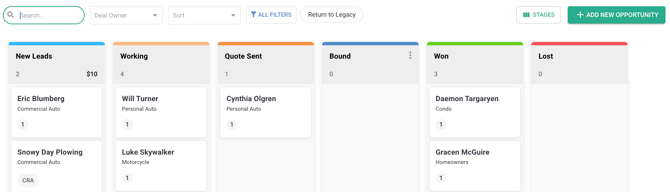
### Reasons Why New Business May Not Appear in the 'Won' Column
- The policy has not been added correctly.
- The system is waiting for a download update.
- The agency is not set up for AMS or downloads, meaning all entries must be manually input.
### Manually Adding a New Policy
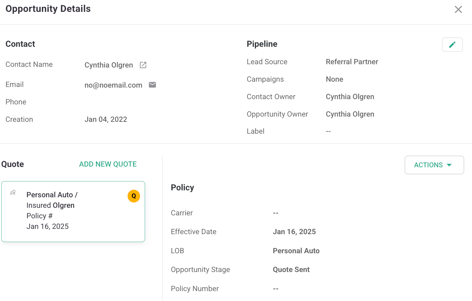
1. **Navigate to the Client's Account.** Click the arrow next to the Contact Name, which will open their profile in a new tab.
****
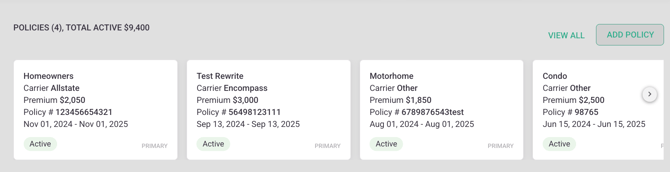
- **Click on 'Add Policy.'**
****
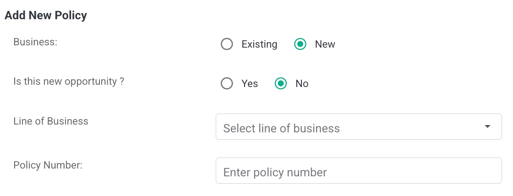
- **Ensure 'New' is selected** instead of 'Existing.'
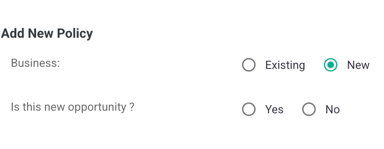
- When prompted, decide whether to add the policy to the sales pipeline:
- If you want to track it as a new policy without pipeline inclusion, select **No**.
- If you want it to go through the sales pipeline, select **Yes**.
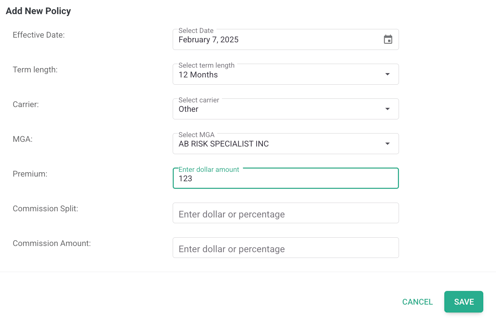
- **Enter policy details**:
- Line of business
- Policy information
- Effective dates
- Term lengths
- Carrier details
- Premium amount
- **Click 'Save'** to finalize the entry.
### Adding a New Business Policy from the Sales Pipeline
- **Create a new opportunity.**
- **Search for the existing contact** and select the correct client.
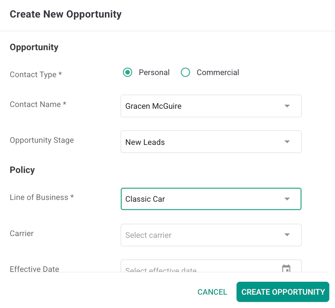
- **Enter policy details**:
- Select policy type.
- Add lead source (if applicable).
- Choose the correct pipeline stage:
- If the policy is not yet bound, place it in 'Working' or another appropriate stage.
- If the policy is already bound and active, move it to 'Won.'
- **Assign a policy owner.**
**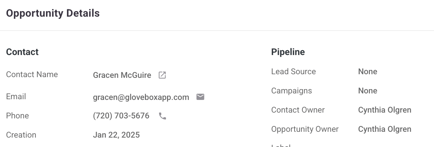**
- **Input all necessary details, including policy number.**
- **Click 'Save'** to complete the process.
### Reviewing Won Policies
- Go to the sales pipeline and select the **'Won' Column**.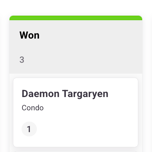
- Verify that policies labeled as **new** are appearing correctly.
- Example: A personal auto policy for a client should show an effective date and 'New' status.
### Utilizing Reports for Tracking New Business
- **Navigate to the Dashboard.**
****
- **Locate the 'New Business Overview' report.**
**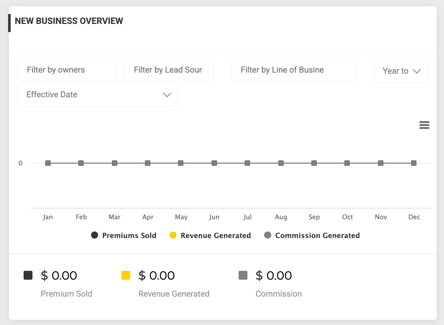**
- **Filter data** by effective date or sold date.
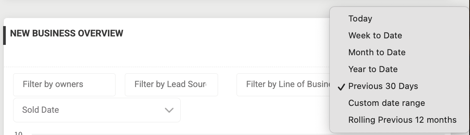
- **Adjust the time frame**:
- View Year-to-Date (YTD), Month-to-Date (MTD), or Week-to-Date (WTD).
- **Review sales data:**
- Yellow represents revenue.
- Gray represents premium sold.
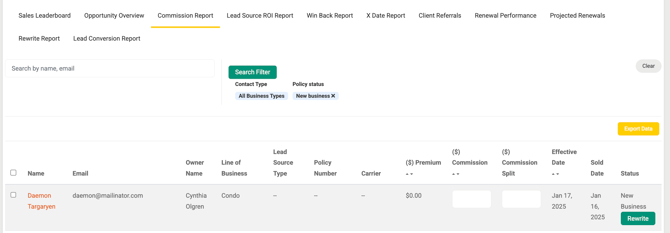
- **Click on 'Premium Sold'** to access the Commissions Report.
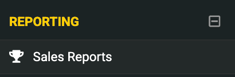
- This report is located under **Reporting \> Sales Reports**.
- Filters can be adjusted to view different time periods.
### Understanding Sales Pipeline Expiration
- Policies remain in the '**Won' Column** for **60 days**.
- Older policies will be archived and may no longer appear in the pipeline.
### Using the Beta Version of the Sales Pipeline
- A new **Beta Sales Pipeline** is available.
- Click **'View Beta'** for an improved user experience.
- Customize visible pipeline stages by using the **Stage Options** feature.
By following these steps, you can ensure that new business is properly tracked, accounted for, and visible in GloveBox CRM.
---

- [GloveBox Quick Links (Start Here!)](https://gbu.gloveboxapp.com/knowledge/glovebox-quick-links-start-here?hsLang=en#main-content)
- [Key GloveBox Resources](https://gbu.gloveboxapp.com/knowledge/glovebox-quick-links-start-here?hsLang=en#key-glovebox-resources)
- [GloveBox Training Events](https://gbu.gloveboxapp.com/knowledge/glovebox-quick-links-start-here?hsLang=en#glovebox-training-events)
- [FAQs](https://gbu.gloveboxapp.com/knowledge/glovebox-quick-links-start-here?hsLang=en#faqs)
- [Client Onboarding Resources](https://gbu.gloveboxapp.com/knowledge/client-onboarding-resources?hsLang=en#main-content)
- [Completing Your Account Set-Up](https://gbu.gloveboxapp.com/knowledge/client-onboarding-resources?hsLang=en#completing-your-account-set-up)
- [Email Campaigns to Promote GloveBox](https://gbu.gloveboxapp.com/knowledge/client-onboarding-resources?hsLang=en#email-campaigns-to-promote-glovebox)
- [Launching and the GloveBox Rollout](https://gbu.gloveboxapp.com/knowledge/client-onboarding-resources?hsLang=en#launching-and-the-glovebox-rollout)
- [Agency Internal Process Updates](https://gbu.gloveboxapp.com/knowledge/client-onboarding-resources?hsLang=en#agency-internal-process-updates)
- [Key GloveBox Workflows](https://gbu.gloveboxapp.com/knowledge/key-glovebox-workflows?hsLang=en#main-content)
- [Managing Client Profiles and Policies](https://gbu.gloveboxapp.com/knowledge/key-glovebox-workflows?hsLang=en#managing-client-profiles-and-policies)
- [Driving Client Adoption with GloveBox](https://gbu.gloveboxapp.com/knowledge/key-glovebox-workflows?hsLang=en#driving-client-adoption-with-glovebox)
- [Resources for Agency Administrators](https://gbu.gloveboxapp.com/knowledge/key-glovebox-workflows?hsLang=en#resources-for-agency-administrators)
- [Glovebox Updates + Enhancements](https://gbu.gloveboxapp.com/knowledge/glovebox-updates-enhancements?hsLang=en#main-content)
- [Latest Release: PolicyAssist](https://gbu.gloveboxapp.com/knowledge/glovebox-updates-enhancements?hsLang=en#latest-release-policyassist)
- [Now Available: GloveBox's White Label App Offering](https://gbu.gloveboxapp.com/knowledge/glovebox-updates-enhancements?hsLang=en#now-available-gloveboxs-white-label-app-offering)
- [GloveBox and Your AMS Data](https://gbu.gloveboxapp.com/knowledge/glovebox-and-your-ams-data?hsLang=en#main-content)
- [Setting Up Your Client List By AMS](https://gbu.gloveboxapp.com/knowledge/glovebox-and-your-ams-data?hsLang=en#setting-up-your-client-list-by-ams)
- [Additional AMS Data Resources](https://gbu.gloveboxapp.com/knowledge/glovebox-and-your-ams-data?hsLang=en#additional-ams-data-resources)
- [Carrier Connections + Integrations](https://gbu.gloveboxapp.com/knowledge/carrier-connections-integrations?hsLang=en#main-content)
- [Applied EPIC SDK Data and Documents Integration](https://gbu.gloveboxapp.com/knowledge/carrier-connections-integrations?hsLang=en#applied-epic-sdk-data-and-documents-integration)
- [Book of Business Carrier Connection](https://gbu.gloveboxapp.com/knowledge/carrier-connections-integrations?hsLang=en#book-of-business-carrier-connection)
- [Policyholder Resources for ClientHub and the Mobile Apps](https://gbu.gloveboxapp.com/knowledge/policyholder-resources-for-clienthub-and-the-mobile-apps?hsLang=en)
- [Resources for GloveBox CRM Clients](https://gbu.gloveboxapp.com/knowledge/resources-for-glovebox-crm-clients?hsLang=en#main-content)
- [GloveBox CRM Account Setup](https://gbu.gloveboxapp.com/knowledge/resources-for-glovebox-crm-clients?hsLang=en#glovebox-crm-account-setup)
- [Managing Service with GloveBox CRM](https://gbu.gloveboxapp.com/knowledge/resources-for-glovebox-crm-clients?hsLang=en#managing-service-with-glovebox-crm)
- [Utilizing GloveBox CRM's Pipelines](https://gbu.gloveboxapp.com/knowledge/resources-for-glovebox-crm-clients?hsLang=en#utilizing-glovebox-crms-pipelines)
- [Building & Managing Campaigns in GloveBox CRM](https://gbu.gloveboxapp.com/knowledge/resources-for-glovebox-crm-clients?hsLang=en#building-managing-campaigns-in-glovebox-crm)
- [Using GloveBox CRM's Medicare App](https://gbu.gloveboxapp.com/knowledge/resources-for-glovebox-crm-clients?hsLang=en#using-glovebox-crms-medicare-app)
- [Integrations](https://gbu.gloveboxapp.com/knowledge/resources-for-glovebox-crm-clients?hsLang=en#integrations)
- [Agency Best Practices](https://gbu.gloveboxapp.com/knowledge/agency-best-practices?hsLang=en)
[](http://Gloveboxapp.com)
*Still need assistance?
Contact us at: [support@gloveboxapp.com](mailto:support@gloveboxapp.com)*
[mailto:support@gloveboxapp.com](mailto:support@gloveboxapp.com)
Copyright © 2025, GloveBox Inc.